Hello! How can we help?
How to report suspicious activity
If you notice a scam, a phishing attempt or activity on your account that you don't recognise, report it to our security team straight away with Report security issue, in the app or on the web.
If you think someone else has access to your account, or you lost a device that can get into it, also lock your account. You can lock it only on the web.
In the app
- Open Account → Support → Report security issue.
- Read the advice and tap Report.
- Choose a Topic and a Subtopic (see the list below).
- Add a short subject and describe the issue in detail.
- If you have evidence, such as screenshots or emails, tap Attach evidence. You can attach up to 5 files, up to 1 MB in total.
- Tap Submit report.
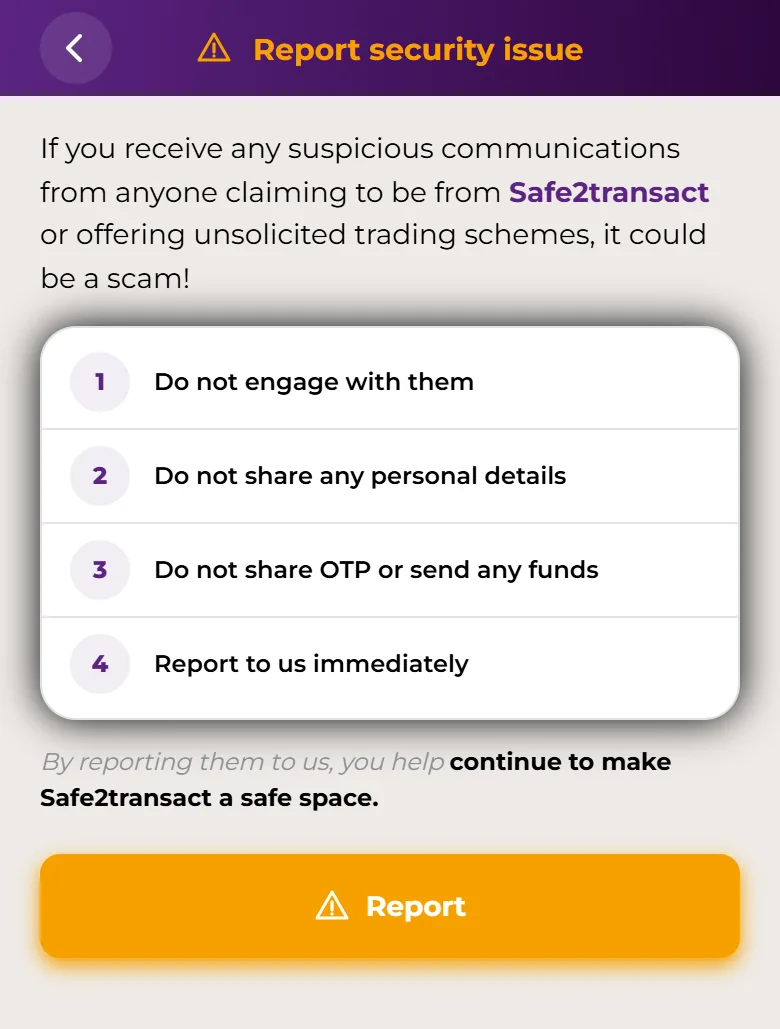
When you see Report submitted, your report has reached our security team. The app's report can't lock your account, even if you choose the Lock account subtopic.
On the web
- Go to Support → Report security issue.
- Click Report.
- Choose a topic under Select a topic and a subtopic under Select a subtopic.
- Add a short subject and describe the issue in detail.
- Attach any evidence with the paperclip icon. Each file can be up to 5 MB.
- If you chose Suspicious activity and want to lock your account, turn on Block my account. You'll confirm with a code sent to your email and a code sent to your phone. Full steps: Lock or unlock your compromised account.
- Click Submit report.
Topics and subtopics
- Fraud & scam: Report a scam, Phishing attempt, Fake apps or websites.
- Suspicious activity: Unauthorized access, Lock account.
After you report
- Our security team will get back to you within a few hours. If funds are at risk, we'll call you.
- Don't engage with the people who contacted you, don't share personal details, and never share codes or send funds.
- Safe2transact staff will never ask for your password, 2FA code or app PIN. More in Suspicious activities.
Can't sign in?
If you can't sign in to the app or the web, contact Support and tell us what happened.