Hello! How can we help?
How to contact support
The quickest way to reach us is a support request from the app or the web. We reply by email. If you can't log in, use the contact form on our website or email us.
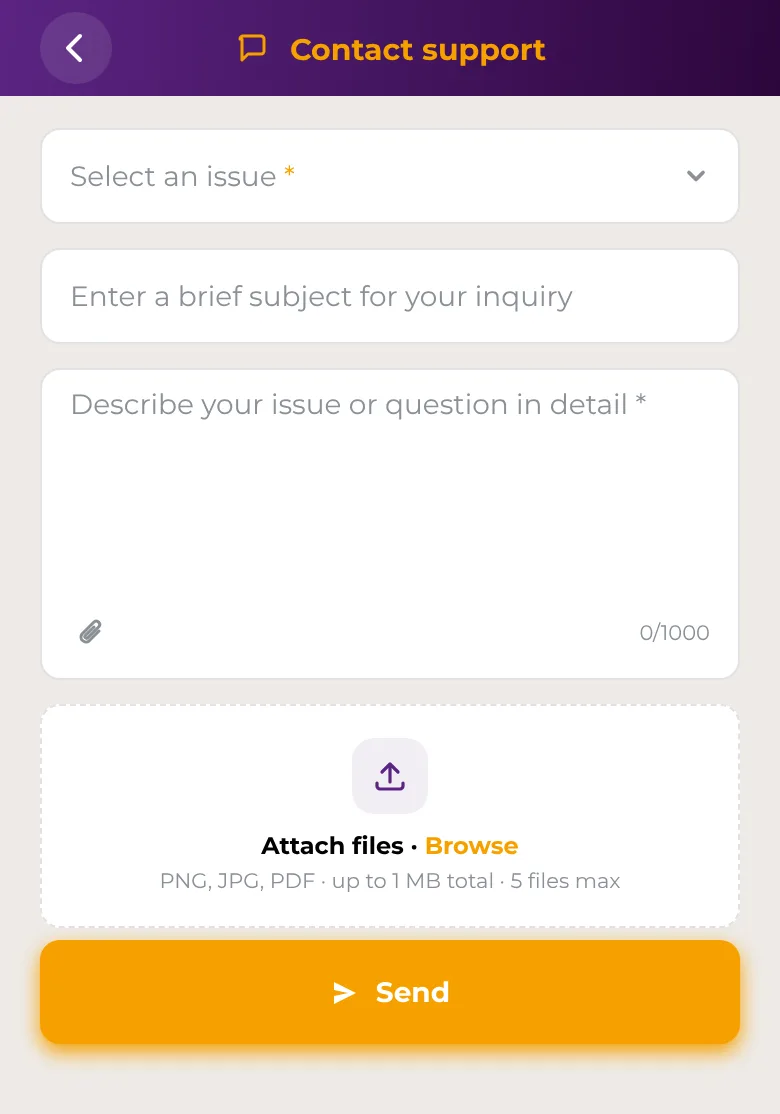
In the app
- Open Account → Support → Contact support.
- Choose an Issue, then a Topic and a Subtopic if they're offered.
- Add a short subject if you like, then describe your question or problem in the message field. Write at least 10 characters.
- To add screenshots or documents, tap Attach files. You can attach up to 5 PNG, JPG or PDF files, up to 1 MB in total.
- Tap Send.
You'll see Ticket submitted with a reference number. The app says we'll reply by email within a few hours, so check your inbox and your spam folder.
On the web
- Log in and open Support → Contact support.
- Choose an issue, a topic and a subtopic.
- Add a subject if you like and describe your question or problem.
- To attach files, click the Attach file icon. You can attach up to 10 files, up to 5 MB each and 25 MB in total.
- Click Send.
You'll see Thank you for contacting us, and we'll get back to you by email as soon as possible.
Report fraud or a security problem
If you notice suspicious activity, a scam or a lost device, use Account → Support → Report security issue in the app, or Support → Report security issue on the web. See How to report suspicious activity.
Make a complaint
See Complaints and how your money is protected.
If you can't log in
Support requests in the app and on the web need you to be logged in. If you're locked out:
- Forgot your password? Use Forgot password? on the login screen. See Password reset.
- Think someone else has access to your account? See Lock or unlock your compromised account.
- Otherwise, use the Contact us form on our website, or email support@safe2transact.com from the email address you registered with.
Good to know
- Choosing the closest issue and topic helps us send your request to the right team.
- Include the details we need to help, such as the date, amount and type of a transaction.
- Never include your password, PIN or verification codes in a message.
- Questions while you're verifying your identity? The verification screens show the email address to write to.