Hello! How can we help?
How to contact support
The quickest way to reach us is a support request from the app. We reply by email. If you can't log in, email us.
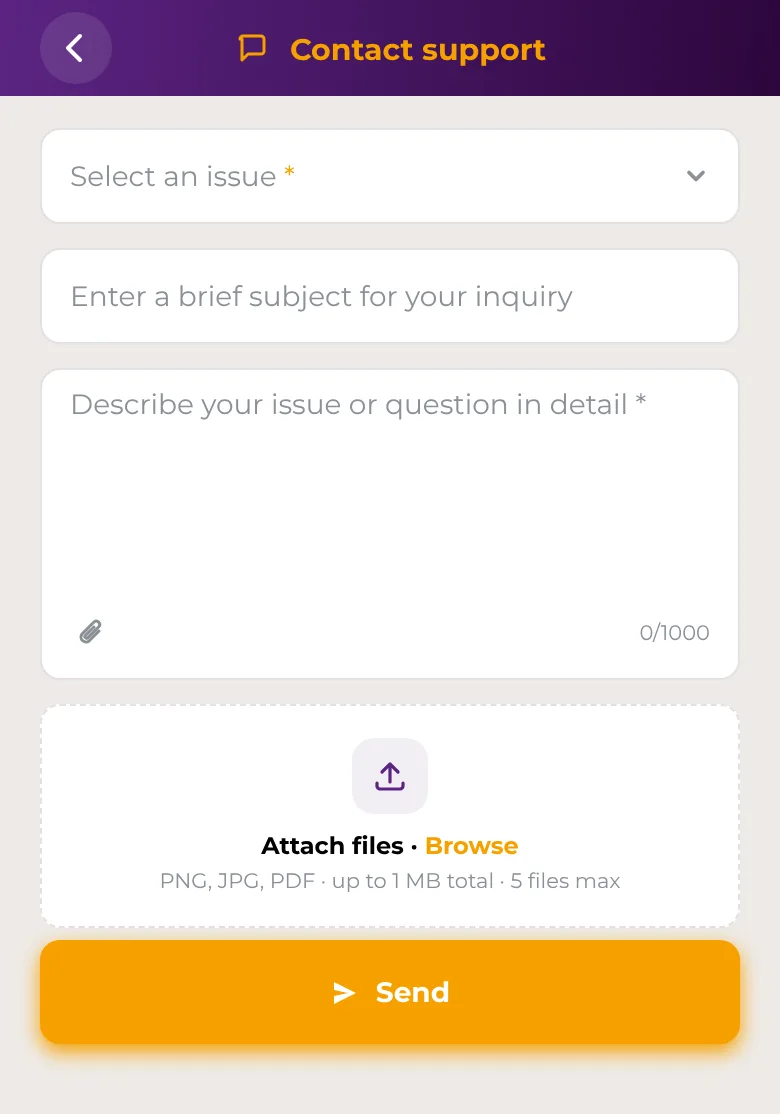
In the app
- Open Account → Support → Contact support.
- Choose an Issue, then a Topic and a Subtopic if they're offered.
- Add a short subject if you like, then describe your question or problem in the message field. Write at least 10 characters.
- To add screenshots or documents, tap Attach files. You can attach up to 5 PNG, JPG or PDF files, up to 1 MB in total.
- Tap Send.
Report fraud or a security problem
If you notice suspicious activity, a scam or a lost device, use Account → Support → Report security issue in the app. See How to report suspicious activity.
Make a complaint
See Complaints and how your money is protected.
If you can't log in
A support request needs you to be logged in. If you're locked out:
- Forgot your password? Use Forgot password? on the login screen. See Password reset.
- Think someone else has access to your account? See Lock or unlock your compromised account.
- Otherwise, email support@safe2transact.com from the email address you registered with.
Good to know
- Choosing the closest issue and topic helps us send your request to the right team.
- Include the details we need to help, such as the date, amount and type of a transaction.
- Never include your password, PIN or verification codes in a message.
- Questions while you're verifying your identity? The verification screens show the email address to write to.